Home Depot keyword research · Free to start

Home Depot Keyword Tool

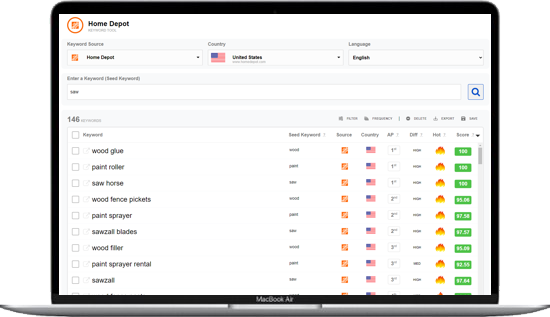
Free Home Depot keyword research from live Home Depot autocomplete. Find keywords shoppers type right now, then use them for product titles, DIY content, and E-commerce ads.

Free keyword tool includes 2 searches per day per keyword source.
Popularity Score and Hot Keywords are relative to your results, not monthly search volume. How scoring works

Free
SEARCHES: 2 / 2
Keyword Source ?
Country ?
Loading countries...
Language ?
Loading languages...
Enter a Keyword ?

Powered by live Home Depot autocomplete

Summary

0 Keywords
0 Hot
0 Avg Score
0 Avg AP
0 AP ≤ 3
0 Low 0 Med 0 High
Difficulty
0 Seeds

Enter a keyword above, then search to build your list.

Developed by the Keyword Tool Dominator founder

Practitioner-built and still used for live autocomplete research. No invented search volume.

Home Depot keyword research tool

Answer: This free Home Depot keyword tool shows the words shoppers type while they search on Home Depot. Enter a seed, pick a market, then pull live Home Depot autocomplete ideas. Use Popularity Score and Hot Keywords to spot stronger phrases, then export them for product titles, DIY content, or ads.

Home Depot search language is project-driven: tools, materials, sizes, and job names. This simple Home Depot keyword research tool pulls live autocomplete, not recycled third-party dumps. Trusted by 300,000+ registered users.

Why Home Depot keyword research matters

Home Depot keywords are the words and phrases people type into Home Depot search. When your listing or content matches those phrases, more shoppers can find the right tools and materials. That is the start of Home Depot keyword research for product pages, DIY guides, and E-commerce ads.

Product titles

Map live Home Depot keywords into titles shoppers see first in search results.

DIY & projects

Match how homeowners and pros search by job, material, size, and brand + tool type.

Content & ads

Harvest real search terms for guides, roundups, and E-commerce ad groups. Save off-topic phrases as negatives.

Unlock full Home Depot research View plans

How to do Home Depot keyword research

Find Home Depot keywords in three simple steps with this free tool.

1. Pick market

Choose the Home Depot country or market available in the tool so results match local language.

2. Search a seed

Enter a tool, material, or project word shoppers would type (for example cordless drill).

3. Filter & export

Sort by score and Hot Keywords, then export for titles, content, or ads.

Sort high-score and Hot phrases first when you want the strongest Home Depot keywords in your niche.

How to choose Home Depot keywords

Use these simple checks when you pick the best Home Depot keywords:

  • Relevance first - the phrase must match the product or project you cover.
  • Shopper language - prefer real Home Depot search terms over internal product names.
  • Specific beats vague - size, material, brand, and use-case words often convert better than broad words alone.
  • Compare inside your list - use Popularity Score and Hot Keywords to rank options you already found.

Strong Home Depot keywords help titles and DIY content match how homeowners and pros search. Keep the best phrases where buyers can read them, and drop ones that do not fit. If a phrase is close but wrong for ads, save it as a negative keyword instead of adding it to the listing.

Where to put Home Depot keywords

Put the right phrases in the right places for listings, content, and E-commerce ads.

Title

Place the best Home Depot keywords where shoppers see them first in search results.

Details & attributes

Add size, material, brand, color, and other fields buyers filter on.

Content & ads

Use strong terms in guides and campaigns. Treat off-topic queries as negative keywords.

Do not stuff every variation into the title. Clear, relevant copy beats keyword stuffing for Home Depot product pages and DIY content. Guide: How to use the Home Depot Keyword Tool

Home Depot keyword search volume (what we show)

Absolute Home Depot keyword search volume figures are not available from Home Depot autocomplete here. We do not invent monthly counts.

  • Popularity Score (0–100) - compare phrases inside your current result set.
  • Hot Keywords - flag rising Home Depot keywords in that same list.
  • Live Home Depot autocomplete - research what shoppers type right now.
  • Free tier: 2 searches per day for this keyword source - upgrade when you need higher limits or saved lists.

Historical search-volume numbers from other tools are often stale estimates. KTD uses live Popularity Score and Hot Keywords from Home Depot autocomplete instead, so you prioritize phrases based on what shoppers type now.

That real-time signal is a stronger trust factor than recycled volume charts. Autocomplete updates continuously; a static “searches per month” figure does not.

More detail: Why KTD uses Popularity Score instead of search volume.

Researching more retail channels? Compare demand with the Walmart Keyword Tool or Google Shopping Keyword Tool.

Home Depot keyword best practices

Keep Home Depot keyword research and listing tips simple:

  • Write for shoppers first; clear titles beat stuffing every Home Depot keyword into one field.
  • Do not paste every variation into the title.
  • Use details and attributes for leftover size, material, and brand words buyers filter on.
  • Save off-topic or low-fit phrases as negative keywords instead of bidding on them.
  • Re-check Home Depot keyword research when seasons, lawn care, HVAC, paint, or holiday projects change.
  • Switch market or country in the tool so suggestions match the storefront you sell on.

Looking for a practical Home Depot keyword research tool for everyday listing and DIY content work? Start free above, then create an account when you need more daily searches or saved lists. This Home Depot keyword tool pulls live autocomplete ideas you can export in seconds.

More help: How to use the Home Depot Keyword Tool · All keyword tools

Next step: Run free Home Depot keyword research in the tool above. Then create a free account to save lists and raise daily limits, or compare lifetime plans when you outgrow the free tier.

Sign up for free View plans

Why researchers trust KTD

Keyword research practitioners have trusted since 2010

Keyword Tool Dominator has served E-commerce sellers, SEO specialists, and content teams since 2010 with over 300,000+ registered users. It began as a practitioner-built tool for real SEO and marketplace research, and it still ships the same core promise: live autocomplete data you can act on.

Live Home Depot autocomplete research

Research live Home Depot autocomplete so product titles, DIY content, and E-commerce ads match what homeowners and pros type right now.

SEO roots before Google dominated

Built by a practitioner active in SEO since the AltaVista era, before Google defined modern search, who still uses these tools for research. About the founder.

Transparent metrics

We show Popularity Score and Hot Keywords relative to your results - not invented absolute monthly volume. Free tiers state daily limits clearly.

Frequently asked questions

What is Home Depot keyword research, and is this Home Depot keyword tool free?

Home Depot keyword research means finding the words and phrases shoppers type into Home Depot search. You get 2 free searches per day for this keyword source. Create an account or upgrade for higher limits and saved lists.

How do I find Home Depot keywords for products and DIY projects?

Use this Home Depot keyword research tool: pick a market, enter a seed (tool, material, or project), then review live autocomplete ideas. Sort by Popularity Score and Hot Keywords to spot stronger Home Depot keywords in your niche, then export winners for titles and content.

Do you show Home Depot keyword search volume?

We do not show absolute Home Depot keyword search volume numbers Home Depot does not publish here. We show Popularity Score (0–100) and Hot Keywords so you can compare phrases inside your current list.

How do I use Home Depot keywords for listings, content, and ads?

Put the best Home Depot keywords in the title where shoppers see them. Add size, material, and brand words to details buyers filter on. Support related phrases in DIY guides and ads. Save off-topic terms as negative keywords instead of bidding on them.

Who should use this Home Depot keyword tool, and can I export results?

Sellers, affiliates, and content teams who want DIY and home-improvement phrases that match real Home Depot search language. Export CSV, CSV for Excel, or TSV for listing and content work. Free tier: 2 searches per day for this keyword source with no credit card.

Starting Keyword Search ...
0.00%
0
Keywords Found
Keyword tip
Target high-scoring HOT keywords to maximize your online presence.
Save Keywords ×

Sign up to save keywords!

Keyword Storage
Free accounts
Save up to 2,500 keywords 2 keyword lists included free Sign Up Free
Paid accounts
Higher storage limits Plus, Pro & Max plans View Pricing
Export Keywords ×

Export keywords to a .CSV, .CSV for Excel, or .TSV file.

Keyword Storage
Free accounts
Save up to 2,500 keywords 2 keyword lists included free Sign Up Free
Paid accounts
Higher storage limits Plus, Pro & Max plans View Pricing
Export Keywords by Word Frequency ×

Export to a .CSV, .CSV for Excel, or .TSV file.

Delete Keywords ×

Permanently delete 0 selected keywords?

This removes them from the keyword list and cannot be undone.

Question Keyword Tool ×

Sign in

Sign in to use the Question Keyword Tool for free.