
 YouTube Keyword Tool
Uncover the most popular YouTube keywords to optimize for and drive more views to your YouTube videos and YouTube shorts.
YouTube Keywords - Effortlessly Find the Hottest Keywords.
Finding the right keywords is essential for optimizing your YouTube videos and YouTube shorts, especially when trying to reach your target views. The YouTube Keyword Tool helps you discover the hottest keywords and most relevant keywords to use for a video title or YouTube short tags.
- Generate thousands of the most popular YouTube keyword suggestions in mere seconds, saving you hours of tedious manual research.
- Find highly relevant YouTube keywords and the top YouTube keywords being used as search phrases by real users searching for videos to watch.
- Identify
 Hot keywords. Discover the hottest trending YouTube keywords to target for maximum reach.
YouTube Keyword Tool Features
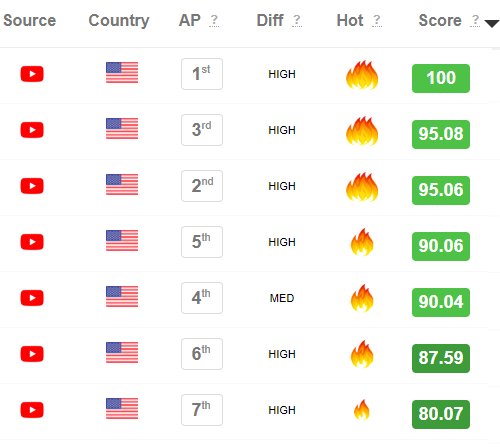
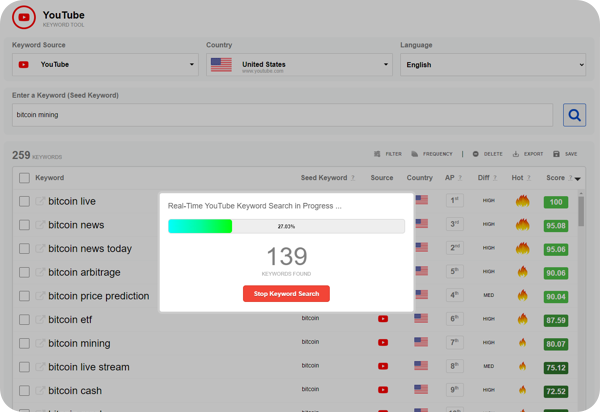
- Uncover the most popular keywords with our Popularity Score ranging from 0 to 100, allowing you to prioritize highly relevant keywords for maximum impact.
- Spot trending topics for new video content with Hot Keywords, highlighted by a fire icon, to capitalize on the latest trends.
- Optimize your YouTube shorts, video title, tags and descriptions with the identified Hot & High-Scoring Keywords, attracting more viewers for those YouTube keyword search terms.
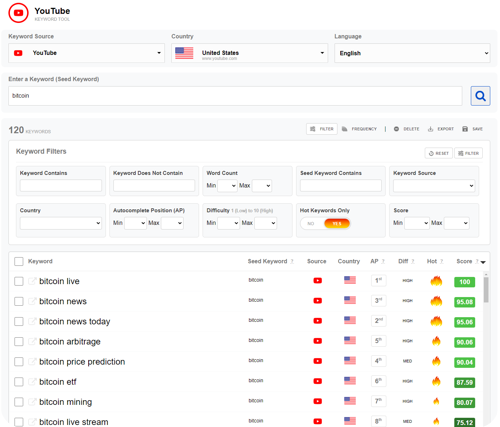
- Filter the list of keywords to quickly identify the most relevant keywords by Popularity Score, Difficulty, or 14 other filters.
- With over 50+ countries to choose from, you can refine your YouTube keyword research to target specific regions and languages, ensuring the most relevant keywords.
- Effortlessly export your results and download your keyword research in a .CSV file for further analysis.
Use Relevant Keywords to Boost YouTube Views
- Increase video visibility by targeting relevant keywords, you can improve your YouTube search ranking in the YouTube search results, making it easier for potential viewers to find your latest videos.
- Drive more traffic and views to your YouTube channel and boost your ad revenue.
- Boost your subscriber count by targeting long tail keywords with high viewership intent, and therefore increasing the chances of converting visitors into subscribers.
- Save time and effort. The YouTube Keyword Tool streamlines the YouTube keyword research process, saving you valuable time and effort.
Start Dominating!
Include in your YouTube videos the hottest keywords with the highest scores and generate more search traffic and increase views.
Best YouTube Keyword Tool for 2025
Leverage our YouTube keyword research tool to quickly find and generate thousands of YouTube keywords.
Use the best keyword search tool for YouTube and eliminate the struggles of YouTube keyword research. Skip spending hours trying to find the right YouTube keywords for your YouTube shorts.
Find 1,000+ YouTube keywords in real-time directly from YouTube in a few minutes or less. Quickly find thousands of the best YouTube SEO keywords with just a few easy steps.
Get Started with the YouTube Keyword Tool in 3 Easy Steps
- 1Choose Your Target Country. Select the country relevant to your audience. You can choose from 50+ different countries, allowing you to tailor your research to specific regions and languages.
- 2Enter Your Seed Keyword. Think of a broad term related to your topic, video content, or story theme and type it into the "Seed Keyword" field. Click the search icon to start the real-time YouTube search for relevant keywords.
- 3Analyze & Implement. Once you've identified relevant keywords, analyze their popularity score, difficulty level, and relevance to your video content. Integrate high-scoring and hot keywords into your video title, YouTube Short tags, and description.
Remember: Don't be afraid to experiment with different keyword combinations and utilize the various features of the YouTube Keyword Tool to uncover the long tail YouTube keywords that will propel your videos to the top of YouTube's search results.
Stop searching, start dominating. The Free YouTube Keyword Tool is your key to unlocking the full potential of YouTube SEO.
Confirm, permanently DELETE 0 selected keywords from the keyword list?