How to do Amazon Keyword Research?

First, let's start off by explaining what Amazon keyword research is and then jump in to the "how to" part afterwards.
Amazon keyword research is the process of finding real Amazon customer search terms (keywords) with the goal of using these keywords for Amazon listing optimization, Amazon PPC campaign keywords, or Amazon affiliate marketing focusing on the aspect of Amazon keyword optimization.
Amazon keyword research can be broken down in to three easy steps.
1) Find relevant keywords for a product and save them in a list.
2) Sort, review, and select keywords to use for optimization based on search popularity and keyword relevance.
3) Use the most popular keywords in your Amazon keyword list for Amazon listing optimization, Amazon PPC campaign keywords, or for Amazon affiliate marketing.
Amazon SEO - How To Guides
Step 1 - Finding Keywords
The first thing to do at this step, is to put together a small list of phrases with one, two, or three words that describe your product.
You should have at least a couple to start with.
For this section, let's use an example product of beach sand molds. Here is a list of some phrases.
- sand molds
- beach molds
- sand toys
- beach toys
For now, we will refer to this list as the list of seed keywords.
These seed keywords will be used to find more related keywords.
If you are having trouble coming up with the phrases to add to the list of seed keywords, don't worry.
Ask Google for related search terms for your product.
Doing a quick Google search for beach sand molds produced the following related search terms.
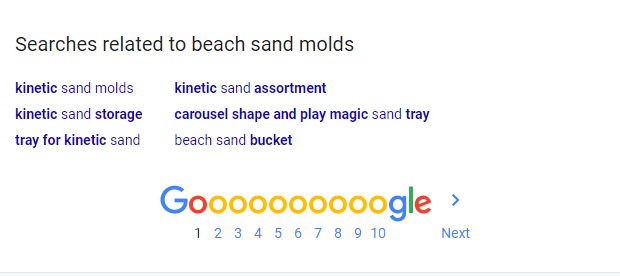
Scroll down to the bottom of the Google search results near the page selection to view the related search terms.
As you can see there are several keywords that can be added to the list.
Now that you have that seed keyword list ready, let's talk about where to find more keywords.
Where to find Amazon keywords?
There are several sources to find keywords for Amazon, but there is no better source than Amazon itself.
Amazon's search box suggestions are the best public place to find keywords.
Keyword data from Amazon's Sponsored Ad reports is also great source for finding keywords and search volume data.
What about Google?
We don't recommend using Google for Amazon keywords, especially considering the keyword data may be misleading given the context of the two platforms.
That said, we do recommend finding keywords from Google Shopping, eBay, and Walmart since these services are competing e-commerce sites.
View the free keyword tools page to access the Google Shopping, eBay, and Walmart keyword tools.
Finding Amazon Keywords from Amazon Search Suggestions
As shown in the image below, when you start typing words into the Amazon search field, Amazon will display suggestions based on the text entered.
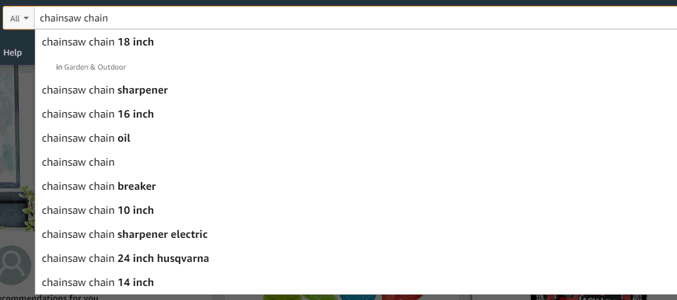
Since these suggestions are search terms used by other customers and there are only 10 suggestions at most, we can infer that Amazon is only providing the most popular suggestions displayed in a specific order.
Before KTD developed the world's first Amazon keyword tool in 2012, you would have to manually type search terms one after another and then write down each suggestion - over and over, which took hours to complete for just one seed keyword.
That's why our founder developed the Amazon Keyword Tool for his own Amazon private label product listing optimization efforts.
With the automation power of KTD's Amazon keyword research tool, the process of finding keywords takes mere seconds.
Even with this massive time improvement, we still only want to keep the relevant keywords.
Which is to say, any keyword that is closely connected or can appropriately describe a product or product features is a relevant keyword.
Only Relevant Amazon keywords are keywords we want to keep during the keyword research process.
The rest can be ignored.
To provide a real-world example, let's once again refer to the image shown previously.
For example, let's say the product was a replacement chainsaw chain for chainsaws with a 16-inch sawblade.
Can you see the relevant and related keywords?
The first few, can be ignored.
Here is the same list of suggestions with the relevant keywords highlighted.
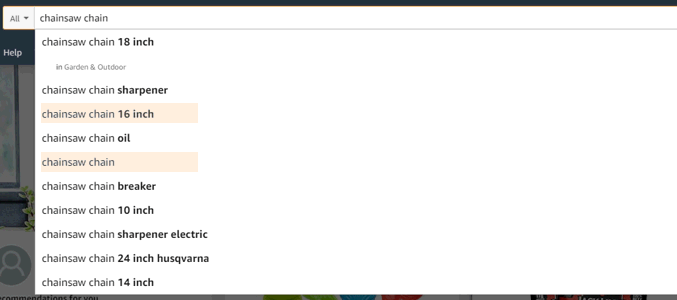
Deciding on whether a keyword is relevant can be more art than science, but if you are unsure, we recommend adding the keyword to the list for review in a later step in the process.
A keyword found during the Amazon keyword research process is referred to as an Amazon keyword.
The best way to keep these keywords is to put them in a list, like our Amazon keyword list above or you can even use a spreadsheet program.
Now this may seem like you are just making a big list of keywords and at first it may seem like that, but in the end, if done correctly, you'll have several hundred and even thousands of relevant keywords.
Great, right?
That sure is a lot of keywords - you might be asking...
Time to sort and review.
Step 2 - Sorting and Reviewing Keywords by Search Popularity
In this step we are going to cover how to best distinguish which keywords you should prioritize and used first by sorting and reviewing the list of Amazon keywords found using an Amazon keyword research tool.
It is important to identify a method for sorting the list of keywords.
In the case of Amazon keyword optimization, this method should result in a list keywords ordered from highest to lowest by either monthly search volume or keyword search popularity.
Given public access to keyword search volume was cut off in 2018 by Amazon, in 2020, we must rely on keyword search popularity.
Luckily, keyword search popularity can be determined based on the position of the keyword suggestion from Amazon's keyword suggest service, i.e. first or last.
A keyword's position in the list of keyword suggestions is a valid indicator of search popularity relative to the other suggestions provided.
For example, keywords in position 1 are more popular than keywords in position 2 and keywords in position 2 are more popular than keywords in position 3, and so on.
You can manually score each keyword for popularity, by simply assigning it a position value.
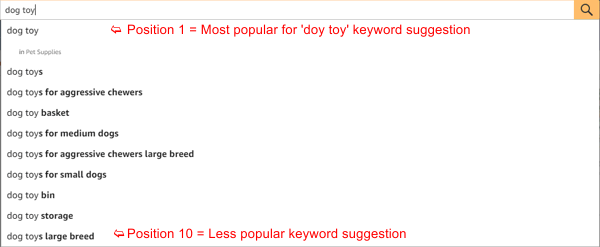
Once you have all the position values for each keyword, you can sort the keyword list by the position value.
If you are doing this process manually, all the position 1 keywords would be a good list to start with.
Amazon Keyword Tool - Keyword Popularity Score & Hot Keywords
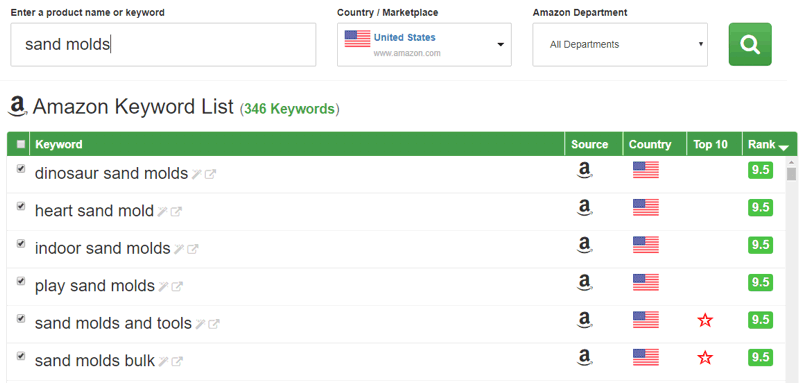
Fortunately, keyword popularity calculations are built in to our Amazon keyword tool and a keyword's popularity is provided with a calculated popularity score and a Hot Keyword indicator.
That being the case, when using KTD's Amazon keyword tool, you can quickly sort by score.
100 being most popular and 0 the less popular.
For more information about score - read the how to guide about how the Amazon keyword tool works.
How do I pick the best Amazon keywords for my listing?
Without more information about the keywords other than the keywords...
The only option is to guess and pick the keywords you think are the most popular and get the most search volume on Amazon.
Unfortunately guessing never turns out very well. Especially, in business.
The keyword research process does not stop at just finding keywords.
At least one more data point about each keyword is needed to help you sort through the keywords and find the most popular.
In 2018 and prior, most Amazon SEO experts would simply use the search volume data provided by Amazon and then sort by the keywords with the highest search volume.
In 2020, accurate Amazon keyword search volume is no longer easily accessible.
That said, for our free Amazon keyword tool, you can use the popularity score and Hot Keyword indicators to pick the most popular search keywords for Amazon.
How to find amazon keyword search volume?
As far as we know, accurate Amazon keyword search volume data is only available after you have run a sponsored ad for some time on a product listing.
Amazon shut down its search volume API endpoint sometime in 2018.
Read this article from Helium 10 for more information about the Amazon search volume API lock down.
It is important to mention that there are several third-party sites offering Amazon keyword search volume data, but be very cautious.
Even Helium 10 is warning its readers about third parties offering false Amazon search volume keyword data.
In 2020, the reality is, to get the monthly search volume for one amazon keyword, you would have to place the highest bid for a given keyword for an entire month. Running an ad campaign like that can get expensive very fast.
Step 3 - Keyword Optimization
Once you have a healthy list of Amazon keywords identified, it's time to add them to your product listing, Amazon PPC campaign, or use them in your Amazon affiliate marketing efforts.